LinkedIn Outreach in 2026: What Still Works (And What Gets You Banned)
LinkedIn has cracked down on automation. Here's how to use the platform effectively for sales without risking your account.
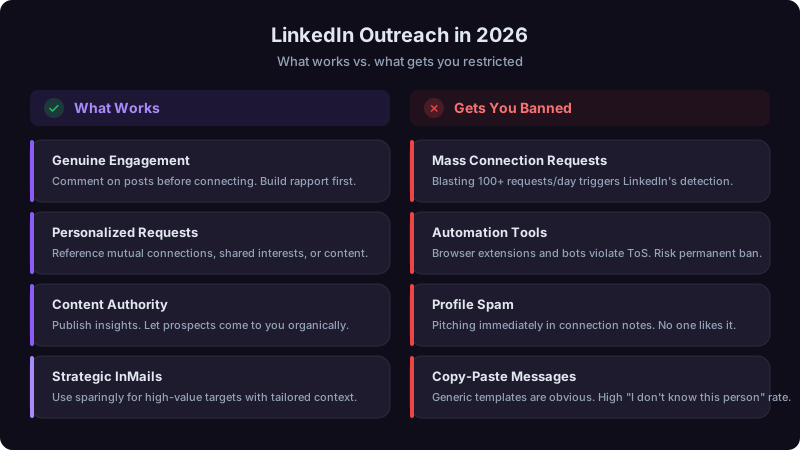
Picture a rep who runs a high daily volume of connection requests through an automation tool, blasting the same message to everyone. Acceptance collapses, meetings dry up, and LinkedIn restricts the account. LinkedIn says members who use tools to automate activity "risk having their accounts restricted or shut down" [1].
The way back is slow and manual: intentional outreach, one prospect at a time. LinkedIn rewards patience, specificity, and actual human behavior. The "spray and pray" era is over. But if you're willing to put in the right kind of effort, LinkedIn remains a strong channel for B2B pipeline.
What Changed (And Why Your Old Playbook Is Dangerous)
LinkedIn prohibits bots and other unauthorized automated methods to send messages, add contacts, or drive inauthentic engagement [1], and its defenses look at behavior, not just at known tools.
Behavior that does not look human draws scrutiny: sudden spikes in connection requests, near-identical messages to many people, bursts of profile views, and activity driven by automation tools. "Undetectable" browser extensions are not a safe bet; LinkedIn notes that prohibited tools "may become non-operational without notice" [1]. A restricted or shut-down account can cost you your entire network.
The stakes are real. A banned account means losing years of network building, all your Sales Navigator saves, and your credibility with prospects who try to find you later.
Profile Optimization: Your Silent Sales Tool
Before you send a single connection request, your profile needs to do the selling for you. Every prospect you reach out to will check your profile within minutes. If it reads like a resume, they'll ignore you.
Bad: "Account Executive at Prospectory | Helping Companies Grow"
Better: "I help B2B sales teams book more meetings from the same outreach volume"
Your headline should answer the question: "Why should I care about connecting with this person?" Lead with what you do for people like them, not your job title.
Structure it like this:
- First two lines (visible before "see more"): A specific, measurable claim or question that hooks your ICP
- Middle: 2-3 short paragraphs about the problems you solve, with real numbers
- End: A clear, low-pressure CTA ("If you're dealing with [problem], I'd welcome a conversation.")
Pin your three best-performing content pieces. Case studies, original posts that got strong engagement, or short videos explaining your POV. This section is prime real estate that most salespeople leave empty.
If a prospect scrolls your profile and sees you haven't posted in months, that's a signal. Your recent activity should show you're engaged in the conversations your ICP cares about.
The Engagement-First Outreach Method
Here is a framework. It takes more time per prospect than blast outreach, and it is far more likely to start real conversations.
Phase 1: Warm Up (Days 1-5)
Before you ever send a connection request, make yourself visible:
- Comment on their posts: Not "Great post!" but an actual thought. Add a perspective, share a relevant experience, ask a follow-up question. Aim for 2-3 sentences minimum.
- Engage with their network: Comment on posts from people they interact with. LinkedIn's algorithm will start showing your name in their feed.
- React to their content: Likes and reactions put your face in their notification tab repeatedly.
The goal here is name recognition. When your connection request eventually arrives, they should think "oh, that person who left that interesting comment" instead of "who is this?"
Phase 2: Connect With Context (Day 5-7)
Now send the connection request. Always include a note; a relevant note gives the prospect a reason to accept. The note should:
- Reference something specific (a post they wrote, a comment you both engaged on, a mutual connection)
- NOT pitch anything
- Be genuinely brief, 2-3 sentences max
Template that works for me: "Hey [Name], I've been following your posts on [topic] and really liked your take on [specific point]. Would love to connect and keep the conversation going."
Template that gets ignored: "Hi [Name], I noticed you're [title] at [company]. We help companies like yours [vague value prop]. Would you be open to a quick chat?"
The difference? The first one is about them. The second one is about you.
Phase 3: Value Before the Ask (Days 7-14)
After they accept, do NOT immediately pitch. This is where many salespeople blow it. Instead:
- Send a genuine thank-you message (one sentence, no links)
- Continue engaging with their content
- Wait 3-5 days, then share something genuinely useful, an article, a data point, an introduction, related to what they care about. No attachment to your product.
Phase 4: The Conversation Starter (Day 14+)
Only now do you move toward a business conversation. And even here, don't pitch. Ask a question:
"I've been thinking about something you mentioned in your post about [topic]. We're seeing something similar with [specific observation]. Curious, how are you approaching [specific challenge] right now?"
This opens a dialogue. From there, if there's a genuine fit, the meeting happens naturally. If there isn't, you've built a real connection who might refer you later.
Content Strategy: Inbound Connections at Scale
Outbound gets you meetings one at a time. Content gets prospects coming to you. A few hours a week of consistent LinkedIn content can bring inbound connection requests from ICP prospects.
What to post (and how often):
| Content Type | Frequency | Purpose |
|---|---|---|
| Personal POV on industry trends | Twice a week | Establish expertise |
| Tactical how-to (short, specific) | Weekly | Provide immediate value |
| Customer win story (anonymized if needed) | Once or twice a month | Social proof |
| Contrarian take or hot take | Once or twice a month | Drive engagement and visibility |
| Comment on others' viral posts | Daily | Piggyback on existing audiences |
The first two lines of your post decide whether anyone reads the rest. Write those lines like email subject lines, specific, curiosity-driving, and relevant to your ICP's daily reality. "[A real, specific result you can back up.] Here's the one change that made the difference." is better than "Thoughts on outbound prospecting in 2026."
What NOT to post:
- Company press releases disguised as personal posts
- Humble brags without actionable takeaways
- Anything that starts with "I'm thrilled to announce..."
- Long posts with no formatting (wall of text = scroll past)
What Gets You Banned (The Full List)
Be explicit with your team about this, because reps can lose accounts they spent years building.
Definite ban risks:
- Any third-party automation tool that controls your LinkedIn actions (Dux-Soup, LinkedHelper, PhantomBuster for connection automation, etc.)
- Scraping profile data at scale
- Sending a high volume of connection requests week after week
- Using multiple LinkedIn accounts
High-risk behaviors:
- Sending connection requests to people with zero mutual connections or shared context (high "I don't know this person" report rate)
- Copy-pasting identical messages to many people
- Viewing an unusually large number of profiles in a single day
- Withdrawing and resending connection requests to the same people
Daily activity habits that stay human. LinkedIn does not publish a safe number, so keep activity at a pace a person could sustain by hand:
| Activity | Habit | Notes |
|---|---|---|
| Connection requests | A modest, steady number | With personalized notes |
| Profile views | Spread throughout the day | No bursts |
| InMails | Reserved for high-value prospects | Only with Sales Navigator |
| Messages to connections | Varied content | Never identical copies |
| Post comments | Substantive | Not one-word reactions |
Using Sales Navigator Properly
Sales Navigator is worth the investment, but many reps use only a small part of it. Here's what actually moves the needle:
Lead and Account saves with alerts: Save your top 100 target accounts and key contacts. LinkedIn will notify you when they post, change jobs, or their company appears in the news. This is your trigger-based outreach fuel.
Boolean search for precision targeting: Don't just search by title and company size. Layer in: time in role (people a few months into a new role are often evaluating tools), posted on LinkedIn in the last 30 days (active users respond more), and mutual connections (warm paths beat cold ones every time).
TeamLink: If anyone at your company is connected to your prospect, you can see that path. A warm introduction usually beats a cold request. Check for one before every cold outreach attempt.
Measuring What Matters
Track these metrics weekly. A simple spreadsheet is enough.
LinkedIn outreach is a compounding channel. The first month will feel slow. You're building visibility, warming up prospects, establishing your content presence. Over the following months, inbound connections, warm conversations, and meetings can build, until prospects start reaching out to you. The reps who quit after 30 days because "LinkedIn doesn't work" are the same reps who never gave the compound effect time to kick in.
A Weekly LinkedIn Routine
Here's a weekly routine to start from:
Monday (30 min): Review Sales Navigator alerts. Note any job changes, company news, or posts from saved leads. Queue up 5-10 engagement targets for the week.
Tuesday-Thursday (20 min/day): Comment on a handful of posts from prospects and industry voices. Send a few personalized connection requests, each with a note, at a pace you could sustain by hand. Respond to any inbound messages. Post original content (Tuesday and Thursday).
Friday (20 min): Follow up on open conversations. Share one piece of content. Review weekly metrics (acceptance rate, response rate, meetings booked). Adjust targeting for next week if needed.
Total time: about 2.5 hours per week. The point of a rhythm like this is consistency: showing up regularly and treating prospects like people, not lead records. LinkedIn does not publish a safe number of requests, so treat this as a habit, not a threshold.
The bottom line: LinkedIn outreach today is slower, more manual, and more personal than what most sales playbooks teach. That's actually good news, because most of your competitors won't put in the effort. The ones who do will own the channel.
References
[1]LinkedIn Help, Prohibited Software and Extensions. https://www.linkedin.com/help/linkedin/answer/a1341387/prohibited-software-and-extensions?lang=en
Ready to transform your sales pipeline?
See how Prospectory's AI-powered platform can help your team research, reach, and relate to prospects at scale.
Related Articles
LinkedIn Commenting for Social Selling: A Practical Playbook
Use thoughtful LinkedIn comments to learn from target buyers, start relevant conversations, and measure whether those conversations create qualified pipeline.
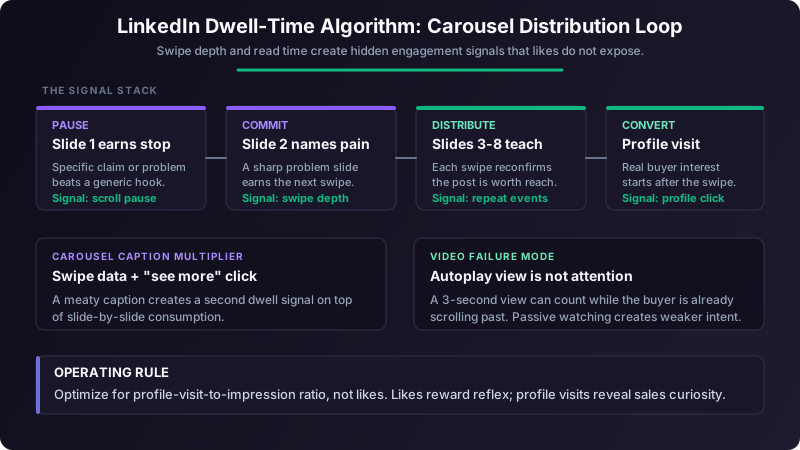
LinkedIn Carousels vs Video: Why Dwell Time Beats Vanity Metrics
Likes are a weak measure of whether a post reached the right buyers. Here is how sales teams can judge carousels and video by attention and profile visits instead.
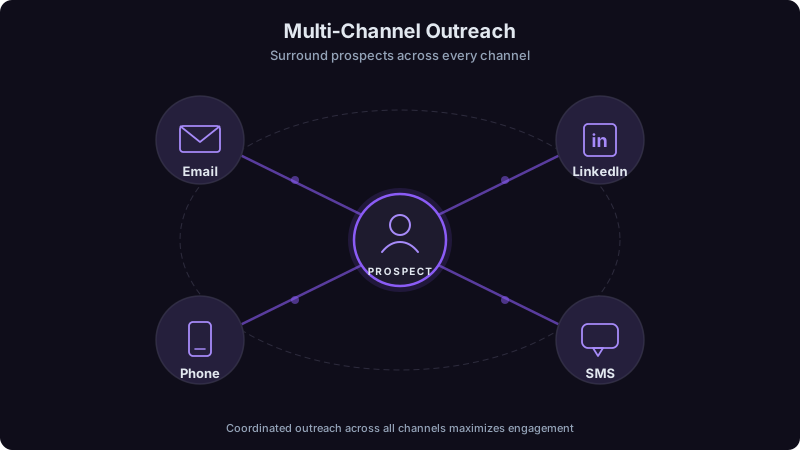
Multi-Channel Outreach: A Practical Coordination and Measurement Guide
Learn how to coordinate email, LinkedIn, phone, and SMS around one audience, message, and measurable campaign plan.