Building a Lean Outbound Tech Stack: What to Buy First on a Small Budget
How to assemble a startup outbound sales stack inside a small monthly budget, in the order each tool earns its place, without paying for tools you'll never use.
Picture an early-stage company with seven prospecting tools running at once, Apollo, ZoomInfo, Cognism, and four others, while its two SDRs manually copy data between systems. That is an illustration, but a familiar one: founders burning seed money on sales tools they barely open.
The problem isn't the tools. The problem is buying solutions before you understand the problem.
This guide shows how a small team can plan an outbound stack around a small monthly budget, in the order that each tool earns its place. Whether a given setup fits your budget depends on current prices, your seat count and your volume. Tool prices change often, so check each vendor's current pricing page and add up your own total before you commit.
The Mistake Most Founders Make
Here's what happens: you close your seed round, hire your first salesperson, and they send you a list of "must-have" tools from their last job at a much larger company. You approve the budget because you want them to succeed. Six months later, you're paying for a pile of platforms while your team still does most of its work in spreadsheets.
Overlap is the usual culprit. Teams buy ZoomInfo for data enrichment, then Apollo because "the data is better," then Clay because "we need more flexibility." All three cover much of the same job, and none gets used to its potential.
More tools also mean more switching, more logins, and more places for data to go stale. Fewer tools that work together beat a long list that doesn't.
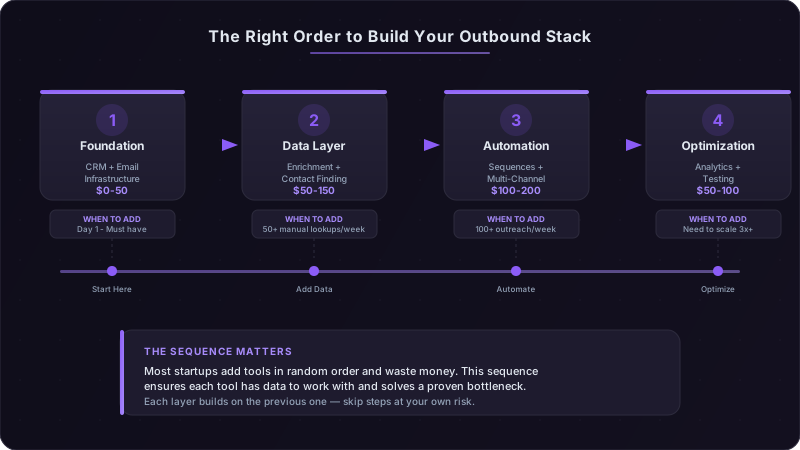
A small sales team needs four categories of tools: a CRM to track deals, a way to find contact information, an email setup that doesn't land in spam, and a way to sequence outreach across channels. Everything else is premature optimization or overlap you pay for twice.
The Core Four: What You Actually Need
Start with the CRM. It is the one non-negotiable.
HubSpot's free CRM covers contacts and basic pipeline management. The catch: limited automation on the free plan. Best for teams that expect to want marketing automation in the same ecosystem later.
Pipedrive offers strong pipeline visualization on low-cost per-user plans. Best for pure sales teams that live in the pipeline view.
Folk is built for relationship-focused selling: CRM meets contact management meets lightweight automation. Best for founder-led sales where every relationship matters more than volume.
Teams succeed with all three. Pick based on where you'll spend most of your time: a large, active prospect list favors a pipeline-first CRM; a founder selling to a short list of perfect-fit accounts may prefer a relationship-first one.
Data Enrichment: The Math You Need to Run
You need accurate email addresses. The question is whether you pay for an enrichment tool or spend minutes per prospect researching by hand.
Apollo's free tier includes a limited number of monthly credits, enough for a low-volume start. Verify emails before you send, because unverified lists bounce, and bounces hurt your sender reputation.
Clay lets you run a waterfall across multiple data sources until one finds a valid email. It costs more than a free tier, so it pays off once your weekly volume is high enough that bounces and manual research become the bottleneck.
Manual LinkedIn research takes several minutes per prospect if you're finding real insight, not just copying job titles. For high-value deals and your first hundred prospects, it can be the best option.
The upgrade trigger: when manual research eats a large part of your week, buy enrichment. When your bounce rate climbs, upgrade your data source or add verification. Not before.
Email Infrastructure: Why This Actually Matters
You need a custom domain on a business email service such as Google Workspace. Not a free consumer address.
Set up SPF, DKIM, and DMARC on your domain. Google requires every sender to Gmail to set up SPF or DKIM, and senders of more than 5,000 messages a day to also set up DMARC [1]. Without authentication, your emails can land in spam regardless of how personalized they are.
Warm up a new domain gradually, starting with recipients who will engage, before you launch outbound at volume. Sudden spikes in sending from a new domain are a red flag to mailbox providers. Google requires senders to keep spam rates reported in Postmaster Tools below 0.3%, and its monitoring guidance recommends staying below 0.10% [1], which is far easier with small, relevant sends.
Outreach Sequencing: Where to Actually Spend Money
You have three paths, and the right one depends on volume.
Native CRM sequences (HubSpot, Pipedrive workflows) are clunky but free or included, and they live in the system you already use. Start here.
Lemlist adds personalization features, deliverability tooling, and A/B testing. Best for teams that care most about personalization and reply quality.
Instantly focuses on volume and spreading sends across multiple inboxes. Best for teams that need to protect domain reputation at higher volume.
Pick based on whether you send a few perfect emails a day or many good-enough ones.
You will be tempted to add tools before you've mastered the basics. Resist for a quarter. Automating messaging you haven't proven manually just automates failure at scale. Master manual outreach first: write personalized emails, track what gets replies, iterate your messaging. Then automate what works.
Where Free Tools Actually Work
LinkedIn Sales Navigator adds advanced search filters, lead recommendations, and InMail. Before you pay for it, you can get a long way with Boolean search on standard LinkedIn: search for "Head of Sales" AND "SaaS" AND "San Francisco", then use the free filters. It's manual and clunky, but it works for a short target list. Upgrade when LinkedIn prospecting takes hours every week.
Hunter.io's free tier includes a small number of email searches each month. Use them to find a company's email pattern (firstname.lastname@company.com versus flastname@company.com), then apply the pattern to other contacts and verify before sending. Save searches for companies where your main enrichment tool comes up empty.
Loom's free plan is enough to test video prospecting. Record a short video that mentions something specific about the prospect's company and paste the link in your email. The video doesn't need production value. It needs to prove you did research. Measure replies against your text-only emails.
The Automation You Can Build for Free
Google Sheets plus Zapier's free plan handles basic workflow automation before you need expensive tools. Free plans cap the number of tasks per month, which is usually enough for a small team's early volume.
Workflows that matter:
- New deal created, then added to a sheet, flagged for research, and a CRM task created
- Email reply received, then logged, lead score updated, and a Slack notification sent
- Contact enriched, then email format validated, added to a sequence, and a follow-up scheduled
These aren't elegant. But they cost little and teach you what automation you actually need before you pay for a sales engagement platform.
The Signal Research Stack for Almost Nothing
Template outreach earns fewer replies than ever. Outreach that references a real trigger, such as a funding round, leadership change, hiring spike, or specific pain point, gives the buyer a reason to answer. A few minutes of account research per prospect is usually the highest-return thing a small team can do.
Google Alerts (free) notifies you when target companies appear in the news. Set alerts for "[Company Name] funding," "[Company Name] acquisition," and "[Company Name] expansion," and email while the news is still fresh.
LinkedIn job postings (free to view) signal budget and pain. A company posting for "Senior DevOps Engineer - Cloud Migration" has told you it is migrating to the cloud and is understaffed for it.
Crunchbase's free tier tracks funding announcements, leadership changes, and acquisitions. Check your target list against it weekly and prioritize accounts with recent changes.
The system costs little and takes a short weekly routine to maintain. You won't catch every signal, but you'll catch enough to make your outreach specific.
Reddit: The Channel You're Ignoring
Reddit is where many buyers compare vendors in their own words. Subreddits such as r/sysadmin and r/devops carry detailed vendor comparisons and implementation stories. Search for "[Your Category]" site:reddit.com to find conversations about your category.
Don't pitch on Reddit. Use it for research:
- What problems are people complaining about?
- What solutions are they recommending to each other?
- What words and phrases do they use to describe their pain?
Then use that language in your outreach. Never contact a poster about their post or quote it back to them.
Multi-Channel Coordination Without Expensive Tools
Email alone, LinkedIn alone, and phone alone each miss people. A coordinated sequence across all three gives buyers several ways to recognize and answer you.
A sequence structure to start from:
Day 1: Personalized email with one specific observation about their company Day 3: LinkedIn connection request with a brief note referencing the email Day 5: LinkedIn message (if they accepted) or a second email (if they didn't) Day 8: Phone call with a voicemail mentioning previous touchpoints Day 10: Email with value-add content (case study, tool, insight) Day 14: Final email acknowledging you'll stop reaching out
Each touchpoint reinforces the others. Measure meetings per prospect for the multi-channel sequence against email alone.
The Manual Sequencing System That Actually Works
Before you pay for automation, build this in your CRM: create custom task types for each channel (Email 1, LinkedIn Connect, Phone Call, Email 2). When you add a prospect, create all six tasks with due dates following the sequence above. Each morning, your CRM shows you who to contact on which channel.
It's tedious and manual, but it costs nothing and teaches you the timing that works before you automate it. Google Calendar can serve as a backup with a dedicated outreach calendar and mobile notifications.
The upgrade threshold: when manual task creation eats a large part of each day, buy a sales engagement platform. Not before.
LinkedIn Content During Prospecting
When you're prospecting someone on LinkedIn, it helps if they've already seen you active in their feed. Post useful, specific content when your audience is most active, check your own post analytics to find that window, and respond to comments early. Your expertise content makes the connection request less cold.
| Tool Category | Free Option | Paid Option | When to Upgrade |
|---|---|---|---|
| CRM | HubSpot free CRM | Pipedrive | You need more automation or a larger active pipeline |
| Data Enrichment | Apollo free tier | Clay | Bounce rates climb or manual research takes too long |
| Email Infrastructure | None (required) | Google Workspace | Immediately |
| Outreach Tool | CRM native sequences | Lemlist or Instantly | Volume outgrows manual sequencing, or you need A/B testing |
| Sales Intelligence | Manual LinkedIn | Sales Navigator | LinkedIn prospecting takes hours every week |
| Video Prospecting | Loom free plan | Loom paid plan | You need longer videos or a larger archive |
The Tools You Should Skip (And Why)
Intent data platforms are priced for larger teams and promise to tell you which companies are researching your category. Early-stage teams usually can't act on the volume. Intent data works when a team can call every account showing signals; a two-person team researching a short list each week mostly ends up with a backlog. Skip it until you have the people to act on it.
Conversation intelligence (Gong, Chorus) is transformative when many reps run many discovery calls and you need patterns across them. When you run a handful of calls a month, record them and review them yourself.
Enterprise sales engagement platforms (Outreach, Salesloft) are built for large teams. They have features a two-person team won't use and complexity that slows it down. You need one when each rep manages a very large active prospect list, you run many A/B tests at once, or you need advanced multi-touch analytics.
The AI Tool Trap
New AI sales tools launch constantly, and your inbox is full of "AI sales assistant" pitches. Every tool you add needs learning time, adds a decision point, and creates another way for your process to fail.
Keep AI tools to a minimum:
- 1One for writing assistance (ChatGPT, Claude, or your CRM's built-in AI)
- 2One for data enrichment (Clay, Apollo)
- 3One for research and intelligence (your CRM's lead scoring or a signal tool)
Three Stack Configurations
The right stack depends on your volume and team. Price each configuration from current vendor pricing pages and keep the total inside your budget.
Lean Stack: Solo Founder
- Google Workspace (one user)
- A low-cost CRM such as Pipedrive or HubSpot's free CRM
- Apollo free tier, with Clay added only when research volume demands it
- Loom free plan
- Standard LinkedIn
Who this works for: founder-led sales with high deal values, where every conversation matters. You're optimizing for conversion on perfect-fit accounts, not volume.
Team Stack: Two-Person SDR Team
- Google Workspace and CRM seats for both reps
- Lemlist for semi-automated sequences
- Clay for enrichment
- Hunter.io for email patterns at hard-to-enrich companies
- LinkedIn Premium for the lead SDR
- Loom free plan
Who this works for: one experienced SDR and one junior rep focused on mid-market accounts, who need efficiency but still care about personalization.
Scaled Stack: Three-Person Team with Specialization
- Google Workspace and CRM seats for three users
- Instantly for volume across multiple inboxes
- Clay on a higher tier for more contacts
- Hunter.io
- LinkedIn Sales Navigator for one user
- A paid Loom plan
Who this works for: higher-volume teams selling to SMB and mid-market, with specialized roles (one person on research, two on outreach).
Across all three, data and infrastructure tend to take a bigger share of spend than most founders expect. That is usually correct: bad data and poor deliverability kill results faster than a mediocre sequencing tool.
Month-by-Month Implementation Plan
Don't buy everything on day one.
Month 1: Foundation only. Set up the CRM and email infrastructure. Send hand-written emails. Track every reply and rejection reason in a spreadsheet. Your goal is to learn what messaging works before automating anything.
Month 2: Add the data layer. Add enrichment once you're sending more personalized emails than you can research by hand. Start on the lowest tier and upgrade only if you hit its limit.
Month 3: Layer in automation. Add Lemlist or Instantly once your manual sequences convert. You're automating a process that already works, not hoping automation fixes a broken one.
Month 4: Optimize and consolidate. Review what's working, cut tools you're not using, and pick ONE upgrade based on your biggest bottleneck: better data, more volume capacity, or better targeting.
The common mistake is adding all three upgrades at once because "we have budget," then wondering why productivity didn't rise with spend. Add tools one at a time and master each before the next.
The Consolidation Point: When Less Becomes More
You've added too many tools when:
- You spend more time managing tools than talking to prospects
- Several tools do the same job
- Your team asks "which tool should I use for X?"
- You can't answer "what's our cost per conversation?" without opening six dashboards
The fix is a consolidation audit. List every tool you pay for. Next to each, write how often it was used last week, what specific outcome it drives, and whether a tool you already have could cover most of that outcome. Cut anything you rarely use, and consolidate tools that overlap heavily.
The quarter rule: if you haven't used a tool's core functionality weekly for a full quarter, cancel it. You're paying for hypothetical future use, not current value.
What to Do in the Next 30 Minutes
Open your current subscriptions and audit what you actually use. You may find you're paying for tools you opened only a few times this month.
Cancel:
- Tools with very few logins in the past 30 days
- Functionality you're paying for twice
- "We might need it later" subscriptions for problems you don't have yet
Set up the foundation:
- 1A business email account on your own domain
- 2SPF, DKIM, and DMARC records
- 3One CRM (HubSpot's free CRM if you're not sure which to pick)
- 4An Apollo free tier account
Start tracking one metric this week: cost per conversation booked. Divide your total monthly tool spend by the conversations booked last month. That's your baseline. Every tool decision should lower cost per conversation or raise conversation volume enough to justify the expense.
References
[1]Google Workspace Admin Help, Email sender guidelines. https://support.google.com/a/answer/81126
Ready to transform your sales pipeline?
See how Prospectory's AI-powered platform can help your team research, reach, and relate to prospects at scale.
Related Articles
The Hidden Cost of Sales Tool Sprawl: A Consolidation Audit for RevOps
License fees are only part of what a sales tech stack costs. Here is a consolidation audit for finding hidden costs, cutting duplicate tools, and preparing your data for AI.
Why Most Cold Emails Get Ignored: The Signal-vs-Template Breakdown
Templated cold email keeps getting ignored while emails that reference a real buying signal still earn replies. Here is the framework, the deliverability basics, and the metrics that close the gap.
You Can Vibe Code a Product. You Cannot Vibe Code Customers.
AI makes product creation faster, but it does not create trust, timing, or pipeline. The new GTM edge is signal-led outreach that starts real conversations.