AI Response Management: How to Handle 10x More Replies Without Hiring
Getting replies is only half the battle. Learn how AI-powered response management turns more conversations into meetings while saving hours daily.
Here's an uncomfortable truth about outbound sales: most teams invest heavily in getting replies and barely think about what happens after someone responds.
I managed response workflows for a 40-person SDR org doing 200,000+ outbound touches per month. We were generating over 3,000 replies monthly across email, LinkedIn, and inbound forms. And we were losing about 40% of the potential value from those replies, not because reps were bad at selling, but because our response management process was broken.
Replies sat unread for hours. Interested prospects got the same slow treatment as tire-kickers. Objections went unhandled because the rep wasn't sure what to say and moved on to the next call. Meeting requests fell through the cracks during timezone-juggling email chains.
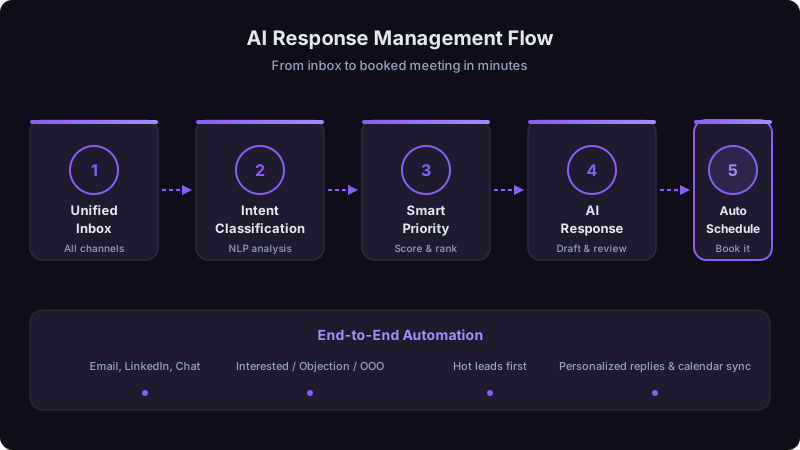
Then we rebuilt the entire workflow with AI-powered classification, routing, and draft generation. Over six months, we went from booking 280 meetings per month to 640, from the same reply volume. Here's exactly how we did it and the framework you can apply.
Why Response Management Is the Highest-ROI Problem to Solve
Most sales teams optimize for top-of-funnel: more emails sent, more calls made, more impressions. And that matters. But the conversion math tells a different story.
Consider a team sending 50,000 emails per month with a 4% reply rate. That's 2,000 replies. If your reply-to-meeting conversion rate is 15%, you're booking 300 meetings.
Now imagine you don't change your outreach at all, same volume, same messaging, but you improve reply-to-meeting conversion from 15% to 30%. You just doubled your meetings without sending a single additional email.
That's the response management opportunity. It's the most underleveraged conversion point in the entire outbound funnel, and it's where AI actually delivers measurable results today.
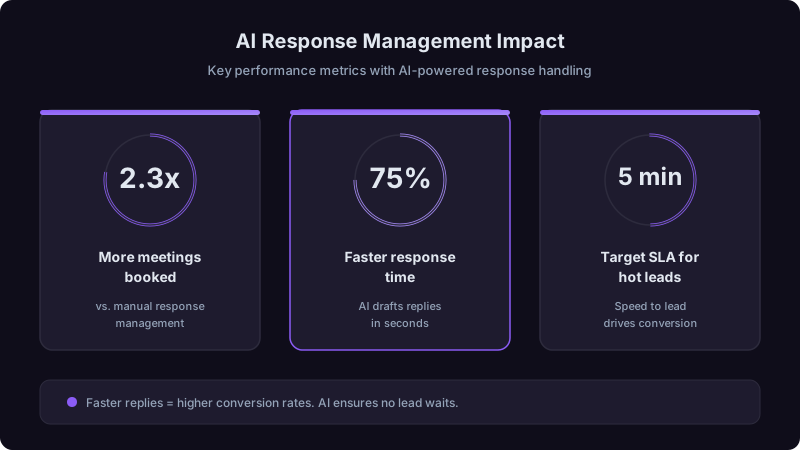
Research from Lead Response Management and Harvard Business Review consistently shows: the first vendor to respond to a prospect's inquiry wins 35-50% of the time. After 5 minutes of wait time, the probability of qualifying that lead drops by 80%. The average B2B company takes 42 hours to respond. If you fix nothing else about your response process, fix speed.
The Five-Layer AI Response System
Here's the system we built, layer by layer. Each layer builds on the one before it. You can implement them incrementally, you don't need all five to see improvement, but the compound effect is significant.
Layer 1: Unified Ingestion
Before AI can do anything useful, every reply needs to land in one place. This sounds simple but was our biggest initial challenge.
Our replies were scattered across:
- Individual rep email inboxes (Outlook and Gmail, depending on the rep)
- Outreach platform reply tracking (Outreach.io)
- LinkedIn InMail notifications
- Website chatbot transcripts
- Inbound form submissions (HubSpot)
- Shared team inboxes for general inquiries
We centralized everything into a single processing queue. Every reply, regardless of source, gets ingested, normalized (stripped of signatures, forwarding chains, and noise), and queued for classification.
I've seen teams try to bolt AI classification onto fragmented inboxes, one tool classifying email replies, another handling LinkedIn, manual review for inbound forms. It doesn't work. You end up with inconsistent classification, no unified analytics, and prospects who replied on LinkedIn getting slower treatment than those who replied via email. Centralize first, then classify.
Layer 2: AI Classification
This is where the AI earns its keep. Every reply gets automatically classified into one of eight categories. The categories matter because they determine routing, urgency, and the appropriate response type.
| Category | What It Means | Example | Urgency | Action |
|---|---|---|---|---|
| Meeting Ready | Prospect wants to talk | "Sure, how about Thursday?" | Critical | Auto-send calendar link within 2 minutes |
| Interested | Positive but needs next step | "This looks interesting, tell me more" | High | AI drafts follow-up, rep reviews and sends |
| Question | Wants information before committing | "How does this integrate with Salesforce?" | High | AI drafts answer from knowledge base, rep reviews |
| Objection - Price | Cost concern | "This seems expensive for our size" | Medium | Route to senior rep with objection playbook |
| Objection - Timing | Not the right moment | "We're mid-contract, check back in Q3" | Medium | Set automated follow-up for specified timeframe |
| Objection - Fit | Doesn't see relevance | "We already use [competitor]" | Medium | Route to rep with competitive positioning |
| Referral | Redirecting to another person | "You should talk to [Name] about this" | High | AI extracts new contact, creates record, routes |
| Not Interested / Unsubscribe | Wants out | "Remove me" or "Not interested" | Low | Auto-unsubscribe, remove from sequences |
Our AI classifier hit 91% accuracy after training on about 5,000 labeled responses. The remaining 9% mostly fell into edge cases where the tone was ambiguous, sarcasm, non-English responses, or multi-topic replies. Those get routed to human review.
You don't need thousands of examples to start. We began with 200 manually labeled replies across the eight categories and got to 78% accuracy. The model improved as reps corrected misclassifications over the first month. The key is building the feedback loop from day one, every correction is training data. After 5,000 examples, we plateaued at 91%, which is good enough for production use with human oversight on low-confidence classifications.
Layer 3: Smart Routing and Prioritization
Classification determines what happens next and how fast.
Immediate routing (< 2 minutes):
- Meeting Ready replies get an auto-generated calendar link and a Slack notification to the account owner.
- Referral replies get processed automatically: AI extracts the new contact's name and role, creates a CRM record, and routes to the assigned rep with context.
Priority routing (< 30 minutes):
- Interested and Question replies surface at the top of the rep's response queue with AI-drafted replies ready for review.
- Price Objections route to a senior AE or the rep's manager, with the objection playbook attached.
Standard routing (< 4 hours):
- Timing objections get a scheduled follow-up created automatically for the date mentioned (or 90 days if no date given).
- Fit objections route to the rep with competitive battle cards and positioning docs.
Automated handling (immediate, no human needed):
- Unsubscribe requests get processed instantly: contact removed from all active sequences, preference updated in CRM, compliance log created.
- Out-of-office replies get parsed for return dates and follow-up is rescheduled automatically.
Not every response can or should be handled by the first rep who sees it. We built an escalation framework:
Meeting Ready, Interested, Questions about basic product capabilities, Timing objections. These are straightforward and within every SDR's ability.
Price objections, Fit objections involving competitor comparisons, Technical questions that require deep product knowledge. The SDR can acknowledge receipt quickly, but the substantive response comes from someone with more authority or expertise.
Responses from C-suite at strategic accounts, Threats (legal, PR, or compliance), Multi-threaded objections that touch on contract terms or partnership structures. These need human judgment and organizational authority.
Security or compliance questions route to the security team with a template SLA. Legal questions route to legal. Product feature requests route to product with a flag for the account's revenue potential.
Layer 4: AI Draft Generation
For every reply that needs a human-crafted response (Interested, Question, Objection categories), the AI generates a draft before the rep even opens the thread.
The draft pulls from:
- The original outreach message and full conversation history: So the response is contextually relevant, not generic.
- The prospect's profile: Company size, industry, role, so the tone and content match.
- Your response playbook: Objection handlers, FAQ answers, competitive positioning documents that your team has refined over time.
- Similar past conversations that converted: The AI identifies responses that led to meetings in similar situations and uses those as templates.
The rep's job is to review, adjust for tone and specifics, and send. Most reviews take 30-60 seconds for straightforward replies and 2-3 minutes for objection handling.
We tested two approaches: fast drafts that were generic (available in < 5 seconds) vs. contextual drafts that took 15-20 seconds to generate. The contextual drafts required 40% less editing by reps and led to 23% higher meeting conversion rates. The extra 15 seconds of AI processing time was invisible to the prospect but meaningful to the rep's workflow. Optimize for draft quality, not generation speed.
Layer 5: Measurement and Optimization
You can't improve what you don't measure. Here are the metrics we track weekly:
Primary metrics:
- Reply-to-meeting conversion rate (by classification category): This is the north star. Overall, and broken down by response type. If your Question-to-meeting rate is low, your FAQ responses need work. If Objection-to-meeting is low, your playbooks need updating.
- Response time by tier: Are you hitting your SLA windows? Where are the bottlenecks?
- Classification accuracy: Track corrections and feed them back to the model.
Secondary metrics:
- Draft acceptance rate: What percentage of AI drafts get sent with minimal editing vs. rewritten? Low acceptance means the drafts aren't good enough.
- Escalation rate: What percentage of responses need escalation? If it's over 20%, your Tier 1 playbooks might need expansion.
- Time-to-close by first response time: Does faster response actually correlate with faster deal cycles in your data? (Spoiler: it does. For us, replies within 5 minutes closed 34% faster than replies after 2+ hours.)
| Metric | Before AI Response System | After (6 Months) | Change |
|---|---|---|---|
| Avg. response time (Tier 1) | 3.2 hours | 3.8 minutes | -98% |
| Reply-to-meeting rate | 14% | 32% | +129% |
| Meetings booked/month | 280 | 640 | +129% |
| Rep hours on response mgmt/day | 3.5 hours | 1.1 hours | -69% |
| Missed/dropped replies per week | ~45 | ~3 | -93% |
Implementation: Where to Start
You don't need to build all five layers at once. Here's the order I'd recommend based on ROI per effort:
Week 1-2: Fix the speed problem first.
Set up alerts for any reply that contains meeting-intent language ("sure," "let's talk," "how about," "calendar," "available"). Route those to Slack immediately. Just this change, notifying reps in real time about hot replies, will improve conversion meaningfully. You can do this with basic automation tools.
Week 3-4: Centralize your inboxes.
Get every reply source feeding into one queue. This might mean integrating your outreach tool, marketing platform, and LinkedIn into a shared view. It's a plumbing project, but it's essential for everything that follows.
Month 2: Add classification.
Start with a simple rule-based classifier (keyword matching for Meeting Ready, Unsubscribe, and Out of Office) and manually classify the rest. This gives you the labeled data you need to train an ML model later.
Month 3: Layer in AI drafting.
Once you have classification working, add draft generation for your highest-volume categories (Interested, Question). Start with templates and evolve to AI-generated contextual drafts as you build confidence.
Month 4+: Build the feedback loop.
Track every metric listed above. Feed rep corrections back to the classifier. A/B test different response templates and playbook variations. This is where the compound gains accumulate.
The Mistakes I Made (So You Don't Have To)
Mistake 1: Automating responses to hot leads.
We tried sending automated calendar links without human review. Two problems: sometimes the classification was wrong (a sarcastic "sure, I'd love another sales pitch" got a calendar link), and even when it was right, the prospect felt like they were talking to a bot. Now, Meeting Ready replies always get human eyes before a calendar link goes out. The auto-notification to the rep is what's automated, the response itself stays human.
Mistake 2: Ignoring out-of-office replies.
OOO replies contain gold: return dates, backup contacts, and sometimes the person's new role if they've moved. We built parsing for all of this. An OOO reply that says "I'm out until Jan 15, contact Jamie Smith in my absence" creates a task for Jan 15 follow-up AND creates a new contact record for Jamie Smith.
Mistake 3: Treating all objections the same.
Early on, every objection went to the same queue with the same template. But a price objection and a competitor objection need fundamentally different responses from different people. Subcategorizing objections and routing them to the right handler improved our objection-to-meeting rate from 8% to 19%.
Mistake 4: Not measuring by source channel.
Email replies, LinkedIn replies, and form submissions have very different intent profiles and conversion rates. We were averaging across all channels, which hid the fact that our LinkedIn response handling was terrible (6% meeting rate vs. 18% for email). Channel-specific analysis revealed channel-specific problems.
If you take one thing from this article: fix your response time first. Everything else, classification, routing, AI drafts, is optimization on top of a foundation of speed. A mediocre response sent in 3 minutes beats a perfect response sent in 3 hours. Get fast first, then get smart.
Response management isn't glamorous. It doesn't have the appeal of a new outbound strategy or a shiny AI writing tool. But it's where the money is. You've already done the hard work of getting prospects to raise their hands. The only question is whether your system is built to catch those raised hands and convert them into conversations, or whether they're disappearing into inboxes, getting stale, and going to your competitors who replied first.
Build the system. Measure the results. Iterate weekly. The math is simple: better response management means more meetings from the same effort. And in this market, that's the edge that compounds.
Ready to transform your sales pipeline?
See how Prospectory's AI-powered platform can help your team research, reach, and relate to prospects at scale.
Related Articles
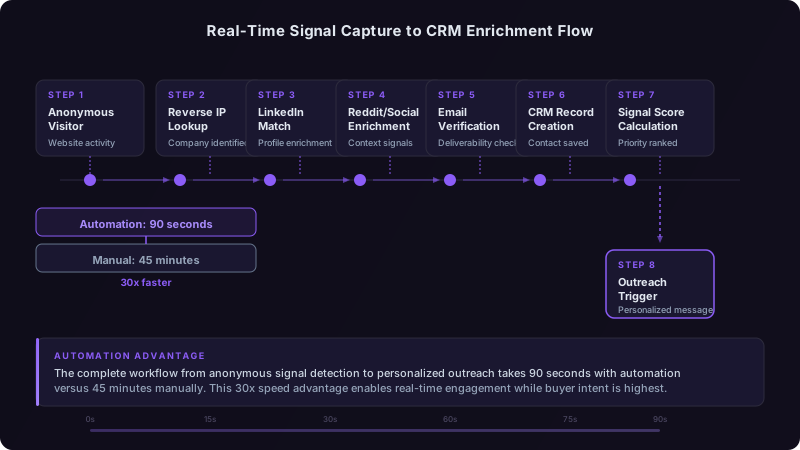
Real-Time Buying Signals vs. Historical Data: Which Actually Predicts Revenue?
Historical patterns tell you who bought before. Real-time signals tell you who's buying now. We analyzed 18 months of pipeline data to find out which matters more.
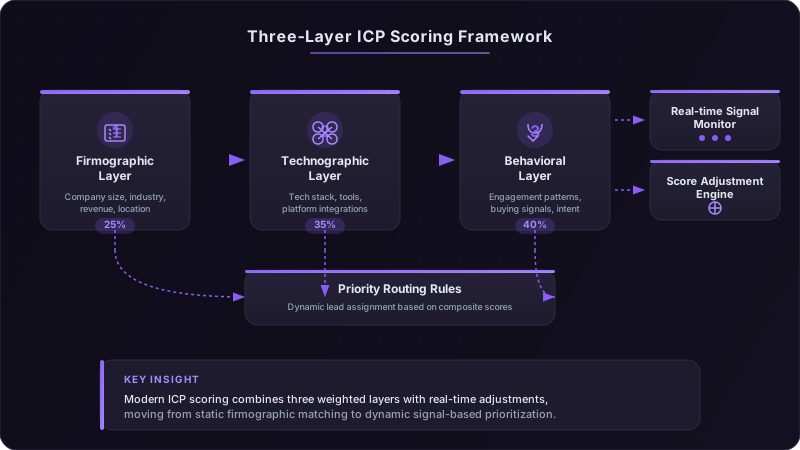
ICP Scoring Models That Actually Predict Revenue
Three $50M+ ARR companies share their exact ICP scoring matrices, combining firmographics, technographics, and behavioral signals to predict deal velocity and close rates.
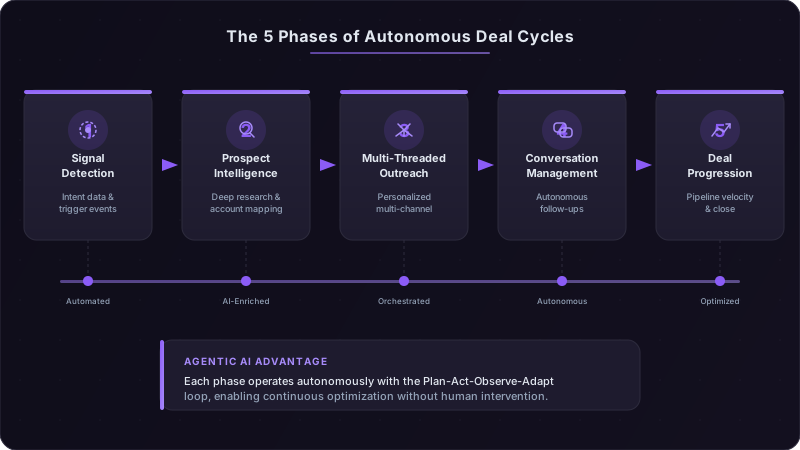
Agentic AI in Sales: How Autonomous Deal Cycles Are Replacing the Traditional Pipeline
Agentic AI is moving beyond task automation into fully autonomous deal orchestration. Learn how self-directed AI agents are compressing 90-day sales cycles into weeks.