Building an Outbound Tech Stack for Under $500/Month
The complete guide to assembling a startup outbound sales stack that actually works-without burning cash on tools you'll never use.
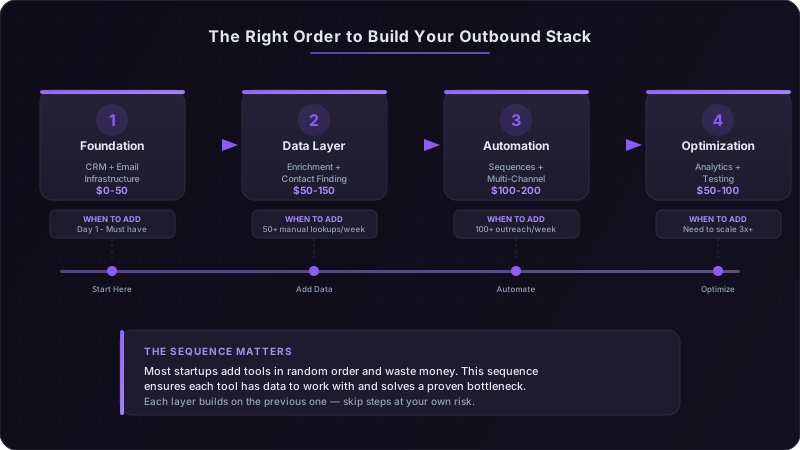
I spent three months watching early-stage founders burn through their seed round on sales tools they opened exactly twice. One company had seven different prospecting tools running simultaneously, Apollo, ZoomInfo, Cognism, plus four others I've already forgotten, spending $2,400 monthly while their two SDRs manually copied data between systems. They were averaging 4 meetings per week. A competitor with a $347/month stack was booking 12.
The problem isn't the tools. The problem is buying solutions before you understand the problem.
The $2,400 Mistake Most Founders Make
Here's what happens: you close your seed round, hire your first sales hire, and they send you a list of "must-have" tools pulled from their last job at a Series C company. You approve the budget because you want them to succeed. Six months later, you're paying for eight platforms while your team still uses Google Sheets for 80% of their workflow.
The average early-stage company wastes $1,800 monthly on overlapping tools in the first six months of outbound. I've seen it across 40+ portfolio companies. They buy ZoomInfo for data enrichment, then Apollo because "the data is better," then Clay because "we need more flexibility." All three do essentially the same thing. None get used to their full potential.
Recent research on AI tool sprawl reveals something critical: workers using three or fewer tools report productivity gains, but adding a fourth tool causes what researchers call "AI brain fry", productivity doesn't plateau, it actively declines. The same pattern holds for sales tools. Three complementary tools create a system. Four create confusion. Seven create paralysis.
A three-person sales team actually needs four categories of tools: a CRM to track deals, a way to find contact information, an email sending mechanism that doesn't land in spam, and a method to sequence outreach across channels. Everything else is either premature optimization or feature overlap you're paying double for.
The Core Four: What You Actually Need
Start with the CRM foundation. This is the only non-negotiable expense, and you have three legitimate options under $50/month.
HubSpot's free tier handles unlimited contacts and basic pipeline management. The catch: limited automation and you'll hit the contact ceiling faster than you think if you're importing lists. Best for: teams that need marketing automation eventually and want everything in one ecosystem.
Pipedrive at $14/user/month gives you better pipeline visualization and won't try to upsell you on seventeen other products. The mobile app actually works. Best for: pure sales teams that live in pipeline view and need nothing else.
Folk at $20/user/month is the new contender, purpose-built for relationship-focused selling. Think CRM meets contact management meets lightweight automation. Best for: founder-led sales where every relationship matters more than volume metrics.
I've seen teams succeed with all three. Pick based on where you'll spend most of your time. If you're managing 500+ prospects simultaneously, go Pipedrive. If you're the founder selling to 50 perfect-fit accounts, try Folk.
Data Enrichment: The Math You Need to Run
Here's the reality of contact data in 2026: you need email addresses and you need them to be accurate. The question is whether you're paying $149/month for Clay's flexibility or spending 8 minutes per prospect on LinkedIn.
Apollo's free tier gives you 250 monthly credits (one credit = one contact export). If you're reaching out to 50 new prospects weekly, that's 200 per month, you'll stay under the limit. The data accuracy sits around 70% for emails, which means 30% bounce rate if you're not verifying. Cost: $0.
Clay at $149/month lets you waterfall through multiple data sources until you find a valid email. You're essentially paying for a 90%+ accuracy rate and the ability to enrich 2,500 contacts monthly. Cost-per-contact drops to $0.06 if you're using the full allotment. Worth it if: you're sending 500+ emails weekly and can't afford a 30% bounce rate killing your domain reputation.
Manual LinkedIn research takes 5-8 minutes per prospect if you're actually finding insights, not just copying job titles. That's 6-7 prospects per hour. If your average deal size is $25K+, this might be your best option for the first 100 prospects. Cost: your time, plus LinkedIn Premium at $40/month for better search filters.
The upgrade trigger: when you're spending more than 10 hours weekly on manual research, buy Clay. When your bounce rate exceeds 15%, upgrade from Apollo free to paid or switch to Clay. Not before.
Email Infrastructure: Why This Actually Matters
You need Google Workspace. Not Gmail. Not a free email address. Not "we'll figure it out later."
Google Workspace at $6/user/month gives you a custom domain email address, which is the minimum requirement for outbound in 2026. Sending cold email from a gmail.com address in 2026 signals "I don't know what I'm doing" to both prospects and spam filters.
Set up DKIM, SPF, and DMARC records on your domain. This sounds technical but takes 20 minutes following Google's documentation. Without these, your emails land in spam regardless of how personalized they are. I've seen teams with perfect copy get 0.8% open rates because they skipped this step.
Warm up your domain by sending 10-20 emails daily to real people (not prospects, team members, advisors, friends) for two weeks before launching outbound. Gmail's spam filters measure sending patterns. New domain + 200 cold emails on day one = automatic spam folder.
Outreach Sequencing: Where to Actually Spend Money
You have three paths here, and the right choice depends entirely on volume.
Native CRM sequences (HubSpot free, Pipedrive workflows) work perfectly fine until you're sending 200+ emails weekly. They're clunky, manual, and require you to set up each sequence from scratch. But they cost $0 and integrate with the system you're already using. Start here.
Lemlist at $59/month adds email personalization (dynamic images, liquid syntax), better deliverability infrastructure, and A/B testing. The email warm-up feature alone is worth $30-40/month compared to standalone tools. Best for: teams sending 300-500 emails weekly who need better open rates.
Instantly at $37/month is the budget option with unlimited email accounts, which matters more than it sounds. You can spread sending across multiple inboxes to stay under spam thresholds while scaling volume. Best for: teams sending 500+ emails weekly and need to protect domain reputation.
The key difference: Lemlist optimizes for personalization and reply rates. Instantly optimizes for volume and deliverability. Pick based on whether you're doing 20 perfect emails daily or 100 good-enough emails.
You will be tempted to add tools before you've mastered the basics. Resist for 90 days. I've watched teams spend $800/month on automation before they'd proven their messaging worked manually. They automated failure at scale. Master manual outreach first: write 100 personalized emails, track what gets replies, iterate your messaging. Only then should you buy tools to scale what's working. The metric that matters: if you can't get 15%+ reply rates with 50 manual, highly-researched emails, don't buy automation tools yet.
Where Free Tools Actually Work
LinkedIn Sales Navigator costs $99/month and gives you advanced search filters, lead recommendations, and InMail credits. Here's what almost nobody tells you: you can replicate 80% of that functionality with Boolean search strings on free LinkedIn.
Advanced search syntax on standard LinkedIn lets you filter by job title, company size, location, and more. Search for "Head of Sales" AND "SaaS" AND "San Francisco" in the LinkedIn search bar, then use the free filters for connections, past companies, and schools. It's manual and clunky, but it works for finding 50-100 prospects monthly.
The upgrade trigger: when you're spending more than 5 hours weekly on LinkedIn prospecting, buy Sales Navigator. Until then, save the $1,200 annually.
Hunter.io's free tier gives you 25 email searches per month. That's enough to find the email pattern at target accounts (firstname.lastname@company.com vs flastname@company.com), then apply that pattern manually to other employees. One search reveals the pattern for unlimited contacts at that company.
Use it strategically: don't waste searches on contacts you can find via Apollo. Use Hunter for companies with locked-down domains where enrichment tools fail. I've found emails for C-suite executives at Fortune 500 companies using this method when $2,000/month intent data platforms came up empty.
Loom's free tier (25 videos, 5 minutes each) is driving 15-30% reply rates for video prospecting in 2026. Record a 60-90 second video mentioning something specific about their company, paste the link in your email, and watch replies roll in. The free tier limits archive to 25 videos, but you're rerecording these anyway for each prospect.
The pattern that works: "Hey [Name], I was looking at [specific thing on their website/LinkedIn] and noticed [observation]. Recorded a quick video to share an idea..." The video doesn't need production value. It needs to prove you did research.
The Automation You Can Build for Free
Google Sheets + Zapier's free tier (100 tasks/month) handles basic workflow automation before you need expensive enterprise tools. Set up a Zap that adds new CRM contacts to a Google Sheet, use Sheet formulas to enrich data with CONCATENATE functions for email patterns, then Zapier pushes clean contacts back to your CRM.
One hundred tasks per month sounds limiting until you realize that's 25 prospects weekly with a 4-step automation. Most seed-stage teams aren't hitting that volume consistently.
The workflows that matter:
- New deal created → Add to Google Sheet → Flag for research → Create task in CRM
- Email reply received → Log in Sheet → Update lead score → Notify in Slack
- Contact enriched → Validate email format → Add to sequence → Schedule follow-up
These aren't elegant. They're Rube Goldberg machines held together with formulas. But they cost $0 and teach you what automation you actually need before spending $200/month on Zapier premium or $500/month on a sales engagement platform.
The Signal Research Stack for $97/Month
Cold email reply rates dropped from 7% to 1-5% in two years. Your prospects receive 120+ sales emails weekly. Template outreach is dead. Signal-based personalization, referencing funding rounds, leadership changes, hiring spikes, specific pain points, achieves 15-30% reply rates.
The math is simple: five minutes of account research increases replies 3-5x. If you're booking meetings from 5% of replies, that research just tripled your meeting volume.
Google Alerts (free) notifies you when target companies appear in news. Set alerts for "[Company Name] funding", "[Company Name] acquisition", "[Company Name] expansion". You'll catch 60-70% of major trigger events within 24 hours of announcement. Response time matters, email them while the news is still warm.
LinkedIn job postings (free to view) signal budget availability and pain points. A company posting for "Senior DevOps Engineer - Cloud Migration" just told you they're migrating to cloud, have budget allocated, and are understaffed. That's your opening line: "Saw you're hiring for cloud migration roles, we help teams like yours cut migration timelines by 40%..."
Crunchbase Basic (free tier) tracks funding announcements, leadership changes, and acquisition activity. Set up a weekly routine: check your target accounts list against Crunchbase updates, flag anyone with recent changes, prioritize them in your outreach queue.
The system costs $0 and takes 30 minutes weekly to maintain. You're not finding every signal, but you're finding enough to 3x your reply rates.
Reddit: The Channel You're Ignoring
Reddit is where your buyers research vendors after they've filtered out marketing content. 68% of Reddit users aren't on LinkedIn, creating a massive blind spot for B2B sellers who only focus on LinkedIn outreach.
r/sysadmin and r/devops generate detailed vendor comparisons and implementation experiences. Search for "[Your Category]" site:reddit.com to find conversations about your product category. You'll find the exact objections buyers have, the features they actually care about, and which competitors they're considering.
Don't pitch on Reddit. Ever. Use it for research:
- What problems are they complaining about?
- What solutions are they recommending to each other?
- What words and phrases do they use to describe their pain?
Then use that language in your outreach. When a prospect sees their exact problem articulated in their own words, reply rates jump. I've seen this push cold email responses from 3% to 18% for teams who do this research consistently.
Multi-Channel Coordination Without Expensive Tools
Email alone is dying. LinkedIn alone is noise. Phone alone is 1997. Combining all three in a coordinated sequence boosts results 287% compared to email-only outreach.
Here's the sequence structure that works in 2026:
Day 1: Personalized email with one specific observation about their company Day 3: LinkedIn connection request with brief note referencing the email Day 5: LinkedIn message (if they accepted) or second email (if they didn't) Day 8: Phone call with voicemail mentioning previous touchpoints Day 10: Email with value-add content (case study, tool, insight) Day 14: Final email acknowledging you'll stop reaching out
Each touchpoint reinforces the others. The phone voicemail increases email open rates by 23% on subsequent sends because they recognize your name. The LinkedIn connection means they see your posts in-feed between outreach touches.
The Manual Sequencing System That Actually Works
Before you spend $200/month on automation, build this in your CRM:
Create custom task types for each channel (Email 1, LinkedIn Connect, Phone Call, Email 2). When you add a prospect, create all six tasks with due dates following the sequence above. Each morning, your CRM shows you exactly who to contact on which channel.
This is tedious. It's manual. It takes 10 minutes daily for 50 active prospects. But it costs $0 and teaches you the timing that works before you automate it.
Google Calendar is your backup system. Create a calendar for "Outreach Sequence" and add events for each prospect at each touchpoint. Set mobile notifications. When the alert fires, send that touchpoint immediately, timing matters more than perfect copy.
The upgrade threshold: when you're managing 100+ active prospects simultaneously and spending more than 90 minutes daily on manual task creation, buy a sales engagement platform. Not before.
LinkedIn Content During Prospecting: The Golden Hour
LinkedIn's algorithm changed in 2025-2026. Organic reach is down 50% year-over-year. But there's a cheat code: the first 60-90 minutes after posting determine if 5,000 or 500,000 people see your content.
Post between 8-10am in your prospects' time zone on Tuesday, Wednesday, or Thursday. LinkedIn tests your post with a small percentage of your network first. High engagement in those first 90 minutes unlocks broader distribution. Low engagement means only your close connections see it.
Comments count twice as much as likes. Dwell time (how long people spend reading) matters more than both. Native video gets a 69% performance boost. Carousels outperform plain text.
Why this matters for outbound: when you're prospecting someone on LinkedIn, they see you're active in their feed. Your expertise content makes the connection request less cold. They recognize your name from the email because they saw your post that morning.
| Tool Category | Free Option | Paid Option | When to Upgrade | Monthly Cost |
|---|---|---|---|---|
| CRM | HubSpot Free | Pipedrive | 500+ contacts or need automation | $0-14 |
| Data Enrichment | Apollo 250 credits | Clay Starter | 15%+ bounce rate or 500+ emails/week | $0-149 |
| Email Infrastructure | None (Required) | Google Workspace | Immediately | $6 |
| Outreach Tool | CRM native | Lemlist or Instantly | 200+ emails/week or need A/B testing | $0-59 |
| Sales Intelligence | Manual LinkedIn | Sales Navigator | 5+ hours/week on prospecting | $0-99 |
| Video Prospecting | Loom Free | Loom Business | Need longer videos or archive | $0-12.50 |
The Tools You Should Skip (And Why)
Intent data platforms cost $500-2,000 monthly and promise to tell you which companies are researching your category. Here's the problem: early-stage teams can't act on the volume anyway.
Intent data works when you have 10 SDRs who can immediately call 100 companies showing buyer signals. When you have 2 SDRs manually researching 50 accounts weekly, intent data just creates guilt about all the opportunities you're missing. Skip it until you have the team to act on the intel.
Conversation intelligence (Gong, Chorus) costs $100+ per user monthly. It's transformative when you're running 20+ discovery calls weekly and need to identify patterns across reps. When you're doing 8 calls monthly, just record them in Zoom (free) and review them yourself.
The upgrade trigger: when you have multiple reps running similar calls and need to identify what top performers do differently. Not before.
Advanced sales engagement platforms (Outreach, Salesloft) start at $100-150 per user monthly and are built for 50+ person sales teams. They have features you'll never use and complexity that slows down two-person teams.
You need a platform this reliable when: you're managing 500+ active prospects per rep, running A/B tests across 10+ sequences simultaneously, or need advanced analytics on multi-touch attribution. If you're not doing those things, you're paying for enterprise features to send the same emails you could send from Lemlist.
The AI Brain Fry Trap
Product Hunt launches 30 new AI tools daily. Your inbox is full of "AI sales assistant" pitches. You've bookmarked 17 different Chrome extensions that "AI-personalize cold email."
Here's what the research shows: productivity gains reverse after adopting more than three AI tools. Workers using four or more AI tools report increased workload, mental fog, and active intention to leave their company.
The problem isn't the tools, it's the cognitive load of managing multiple tools, validating their outputs, and integrating them into your workflow. Each tool requires learning time, adds a decision point to your process, and creates another potential failure mode.
Stick to three AI tools maximum:
- 1One for writing assistance (ChatGPT, Claude, or your CRM's built-in AI)
- 2One for data enrichment (Clay, Apollo)
- 3One for research/intelligence (your CRM's lead scoring or a signal tool)
Everything else creates complexity that slows you down more than the tool speeds you up.
Three Budget-Tier Stack Configurations
The right stack depends entirely on your volume and team structure. Here's how to think about the three tiers:
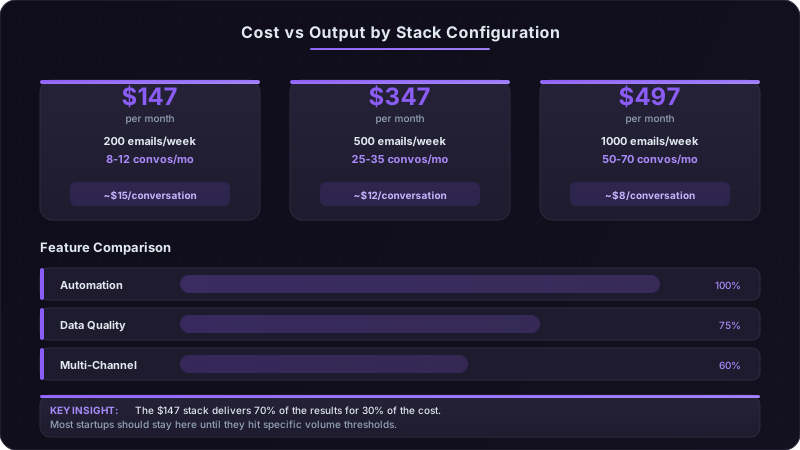
The $147/Month Stack: Solo Founder
What you're buying:
- Google Workspace: $6/month
- Pipedrive: $14/month
- Clay Starter: $149/month (pay annually for 2 months free, drops to $12.42/month)
- Apollo free tier: $0
- Loom free: $0
- LinkedIn standard: $0
Total: $147/month (or $32 if you skip Clay and go manual)
This stack handles:
- 50 highly-researched prospects monthly
- 200 personalized emails weekly
- 8-12 conversations monthly if your targeting is tight
- Manual sequencing via CRM tasks
- Basic data enrichment via Apollo + Clay waterfall
Who this works for: Founder-led sales at companies with $50K+ ACV where every conversation matters. You're not optimizing for volume, you're optimizing for conversion rate on perfect-fit accounts.
The $347/Month Stack: Two-Person SDR Team
What you're adding:
- Google Workspace: $12/month (2 users)
- Pipedrive: $28/month (2 users)
- Lemlist: $59/month
- Clay: $149/month
- Hunter.io Pro: $49/month (adds 500 searches)
- LinkedIn Premium: $40/month (for lead SDR)
- Loom free: $0
Total: $347/month
This stack handles:
- 100 researched prospects weekly
- 500 personalized emails weekly
- 25-35 conversations monthly
- Semi-automated sequences via Lemlist
- Better data accuracy via Hunter + Clay combo
Who this works for: Teams with one experienced SDR and one junior rep, focusing on mid-market accounts with $15-30K ACV. You need better efficiency but still care deeply about personalization.
The $497/Month Stack: Three-Person Team with Specialization
What you're adding:
- Google Workspace: $18/month (3 users)
- Pipedrive: $42/month (3 users)
- Instantly: $37/month (better for volume)
- Clay: $349/month (Pro tier, 10K contacts)
- Hunter.io Pro: $49/month
- LinkedIn Sales Navigator: $99/month (1 user)
- Loom Business: $12.50/month
- ZoomInfo Lite: $95/month (fills gaps Clay misses)
Total: $497/month
This stack handles:
- 200 researched prospects weekly
- 1,000 personalized emails weekly
- 50-70 conversations monthly
- Fully automated sequences with A/B testing
- Multiple email domains for deliverability
- Specialized roles (one person on research, two on outreach)
Who this works for: Teams selling to SMB/mid-market with $10-20K ACV, higher volume requirements, and enough inbound to focus outbound on net-new accounts.
The key insight across all three tiers: you're spending 60-70% of budget on data and infrastructure, only 20-30% on actual outreach tools. That's inverted from what most founders expect, but it's correct, garbage data and poor deliverability kill results faster than a mediocre sequencing tool.
Month-by-Month Implementation Plan
Don't buy everything on day one. Here's the right implementation sequence:
Month 1: Foundation Only
Set up CRM and email infrastructure. Send manually-crafted emails. Track every single reply and rejection reason in a spreadsheet. Your goal: learn what messaging works before automating anything.
Spend: $20 (Google Workspace + Pipedrive) Target: 40 sent emails, 8-10% reply rate, 2-3 conversations booked
What to master: email copywriting, subject lines that get opened, CTAs that get responses. You're learning the fundamentals that automation will later scale.
Month 2: Add Data Layer
Add Clay once you're consistently sending 100+ personalized emails weekly and can't keep up with manual research. Start with the Starter tier and upgrade only if you hit the contact ceiling.
Spend: $169 total (base stack + Clay) Target: 100 sent emails weekly, maintain 8-10% reply rate, 4-5 conversations booked
What to master: data enrichment workflows, email verification, pattern recognition on what contact info is most accurate.
Month 3: Layer in Automation
Add Lemlist or Instantly once you've proven your manual sequences convert. You're automating a process that already works, not hoping automation fixes a broken process.
Spend: $228 total (base stack + Clay + Lemlist) Target: 200 emails weekly, 10-12% reply rate, 8-10 conversations
What to master: sequence timing, multi-channel coordination, A/B testing subject lines and opening paragraphs.
Month 4: Optimization and Consolidation
Review what's actually working. Cut tools you're not using. Double down on channels driving results. Most teams realize they're paying for features they never touched.
This is when you decide: do we need better data (upgrade Clay), more volume capacity (add Instantly), or better targeting (add Sales Navigator)? Pick ONE upgrade based on your biggest bottleneck.
The mistake most teams make: adding all three upgrades simultaneously because "we have budget." Then wondering why productivity didn't increase proportionally. Add tools sequentially, master each before adding the next.
The Consolidation Point: When Less Becomes More
You'll know you've added too many tools when:
- You're spending more time managing tools than talking to prospects
- You have multiple tools doing the same job (data enrichment from three sources)
- Your team asks "which tool should I use for X?"
- You can't answer "what's our cost per conversation?" without opening six dashboards
This usually happens around month 6-8 for fast-growing teams. The fix: brutal consolidation audit.
List every tool you're paying for. Next to each, write:
- How many times was it used last week?
- What specific outcome does it drive?
- Could we achieve 80% of that outcome with a tool we already have?
Cut anything used less than 10 times weekly. Consolidate anything with 50%+ feature overlap. Most teams find they can cut 3-4 tools without losing effectiveness.
The 90-day rule: If you haven't used a tool's core functionality at least once weekly for 90 days straight, cancel it. You're paying for hypothetical future use, not actual current value.
What to Do in the Next 30 Minutes
Open your current tool subscriptions and audit what you're actually using. My bet: you're paying for at least two tools you opened less than five times this month.
Here's your immediate action plan:
Cancel these right now:
- Any tool with less than 10 logins in the past 30 days
- Duplicate functionality you're paying for twice
- "We might need it later" subscriptions for problems you don't have yet
Set up the foundation:
- 1Google Workspace with custom domain if you don't have it
- 2DKIM/SPF/DMARC records (follow the 20-minute setup guide)
- 3One CRM (HubSpot free if you're not sure which to pick)
- 4Apollo free tier account
Start tracking one metric this week: cost per conversation booked. Divide your total monthly tool spend by conversations booked last month. This is your baseline. Every tool decision should be evaluated against "does this lower cost per conversation or increase conversation volume enough to justify the expense?"
Most early-stage teams spend $800-2,000 monthly on tools while booking 8-15 conversations per month. That's $53-250 cost per conversation before you factor in salary. A $347 stack booking the same 12 conversations drops that to $29 per conversation, you've just freed up $500-1,700 monthly to invest in hiring, content, or literally anything else that scales revenue.
The compound effect: 12 months of $1,500 monthly savings is $18,000. That's half an SDR salary or 600 hours of founder time you're not spending managing tools that don't drive measurable results.
Ready to transform your sales pipeline?
See how Prospectory's AI-powered platform can help your team research, reach, and relate to prospects at scale.
Related Articles
LinkedIn Comments Are Worth 8x More Than Likes: A Social Selling Playbook
LinkedIn's algorithm now rewards comments over likes by 8x in reach. Here's how to engineer conversations that turn comment threads into qualified pipeline.
Multi-Threading Enterprise Deals: A Practical Playbook
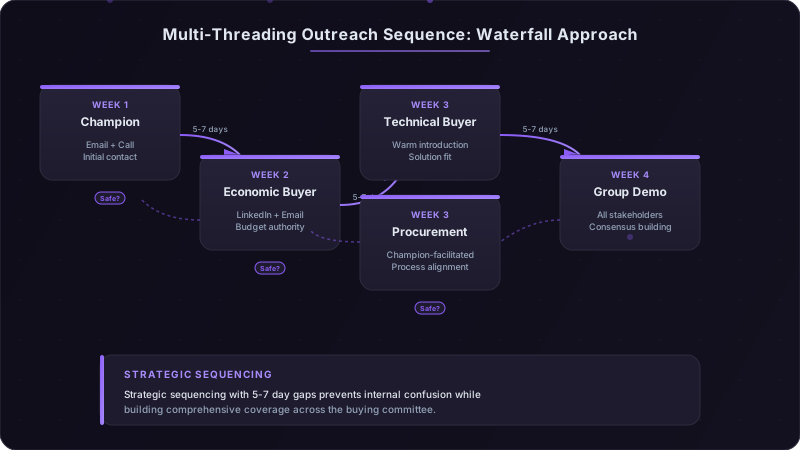
How to map buying committees, identify champions vs. blockers, and run coordinated outreach to 4-7 stakeholders without creating internal politics or confusion.
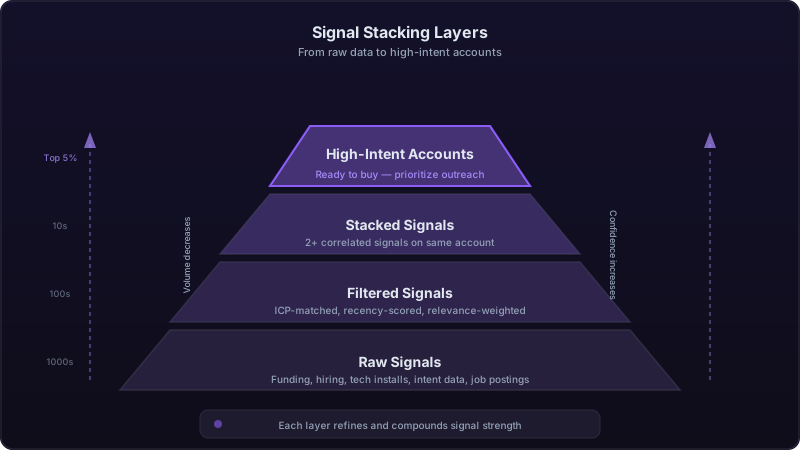
Signal Stacking: How Compound Buying Indicators Predict Revenue 10x Better Than Single Signals
One buying signal is noise. Two is a pattern. Three or more is a revenue opportunity. Learn the signal stacking methodology that's transforming pipeline prediction accuracy.