Your CRM Data Is a Liability: How Bad Data Costs You Deals
40% of CRM data decays annually. Learn how data quality issues are killing your pipeline and what to do about it.
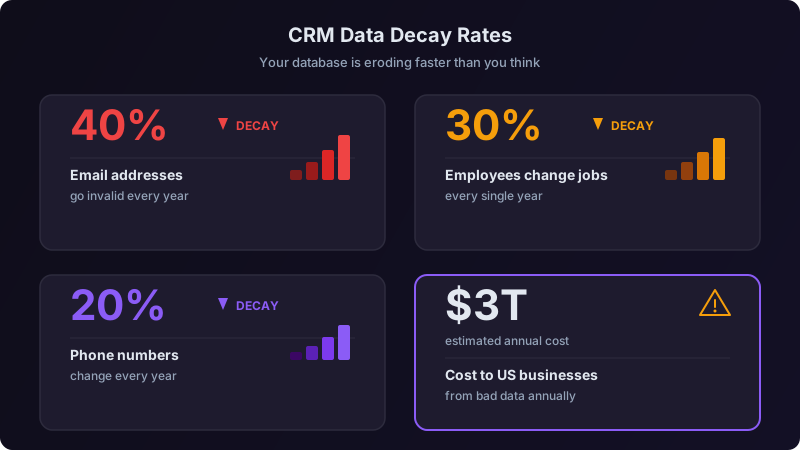
I've run RevOps at three companies now. At every single one, I've inherited a CRM that the previous team swore was "mostly clean." And at every single one, my first audit revealed the same thing: the data was a disaster, and it was costing the company real money in ways nobody had bothered to quantify.
At my last company, we did the math. Bad CRM data was costing us $1.2 million per year. Not in some abstract "opportunity cost" way, in actual wasted spend, lost deals, and misallocated headcount. That number got the CEO's attention. It should get yours too.
Here's what I've learned about why CRM data rots, what it actually costs, and how to fix it without losing your mind.
The Data Decay Problem Is Worse Than You Think
B2B data doesn't slowly lose freshness. It actively decays. People change jobs, companies rebrand, get acquired, go under. Phone numbers rotate. Emails bounce. And it compounds, if you lose 3-4% of data accuracy per month, you're looking at 40%+ decay annually.
Here's what that looks like in practice. I pulled these numbers from our own CRM audit last year across 47,000 contact records:
| Data Issue | % of Records Affected | How We Found It |
|---|---|---|
| Invalid email address | 31% | Bulk verification tool |
| Wrong job title (person changed roles) | 24% | LinkedIn cross-reference sample |
| Person left the company entirely | 19% | Email bounce + LinkedIn check |
| Duplicate records | 14% | Fuzzy match on name + company |
| Missing critical fields (phone, title, or company size) | 41% | Null field report |
| Wrong company association | 7% | Manual spot check |
Nearly a third of our email addresses were dead. One in five contacts didn't even work at the company listed in our CRM anymore. And we were actively running sequences against this database every day, wondering why reply rates were declining.
Data quality doesn't collapse overnight. It erodes gradually, so teams adapt to declining performance without realizing the root cause. Your reply rates drop 0.5% per month. Your bounce rates creep up. Your reps start saying "outbound just doesn't work as well anymore." It's not outbound that stopped working, it's your data.
The Real Cost of Bad Data (With Actual Numbers)
When I say bad data is expensive, I mean it in five specific ways. Here's how I built the business case at my last company.
1. Wasted Rep Time: $420K/Year
We had 12 SDRs spending roughly 30% of their time on activities that failed because of bad data: calling disconnected numbers, emailing bounced addresses, researching accounts that had been acquired, preparing for meetings with contacts who'd left the company. At a fully loaded cost of $85K per SDR, that's $420K in wasted labor annually.
2. Lost Pipeline from Missed Opportunities: $380K/Year
Bad data doesn't just waste time, it hides good leads. We found 2,100 records that had been incorrectly disqualified or buried because of data issues: duplicate records where activity was split across two entries (so neither hit the engagement threshold), contacts marked as "bounced" who actually just had a typo in their email, and accounts miscategorized by size or industry that fell out of our ICP filters. Conservative estimate: 8% of those would have converted to pipeline at our average deal size. That's $380K in pipeline we never created.
3. Deliverability Damage: $180K/Year
Sending to invalid emails tanks your sender reputation. Our primary domain hit a 7.2% bounce rate before we caught it. That triggered spam filters across the board, dropping deliverability on valid emails from 94% to 78%. For three months, nearly a quarter of our legitimate outreach wasn't reaching inboxes. Estimated pipeline impact: $180K.
4. Bad Forecasting: Unquantifiable but Real
Our pipeline was inflated by 15-20% because of stale opportunities tied to contacts who'd left companies. The VP of Sales was making hiring and spending decisions based on a pipeline number that was materially wrong. We hired two reps we didn't need based on projected growth that wasn't real.
5. Compliance Exposure: A Ticking Clock
Under GDPR and CCPA, you're required to maintain accurate data and honor opt-out requests. If a contact's record is duplicated across three entries and they unsubscribe from one, are you confident the other two stop receiving emails? We weren't. That's not just a fine risk, it's a brand trust issue.
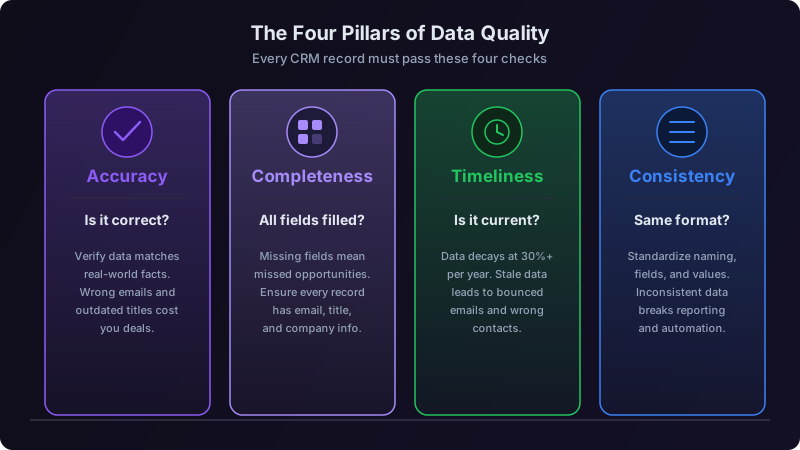
The Seven Most Common Data Quality Issues
After auditing CRMs at three companies and consulting with a dozen others, here are the issues I see over and over.
1. Contact Decay (The Big One)
People change jobs on average every 2.5 years. In sales and marketing roles, it's closer to 18 months. If you're not continuously monitoring for job changes, your database ages out fast.
2. Duplicate Records
The average CRM has 10-30% duplicate records. They happen when leads come in from multiple sources (marketing form, sales import, integration sync) without proper deduplication. Duplicates split activity history, making it impossible to see the full picture of an account's engagement.
3. Incomplete Records
Missing fields are the silent killer of personalization and segmentation. If 40% of your records are missing company size, your AE team can't properly tier accounts. If you don't have direct phone numbers, your cold call strategy is dead on arrival.
4. Inconsistent Formatting
"VP of Sales" vs "VP Sales" vs "Vice President, Sales" vs "Head of Sales." Same role, four different text strings. This breaks reporting, segmentation, and duplicate detection. Multiply this across every field and you've got chaos.
5. Orphaned Records
Contacts tied to companies that no longer exist, or companies with no associated contacts. These clog up your database and skew metrics without providing any value.
6. Activity Attribution Errors
When integrations between your MAP, CRM, and outreach tools lose sync, activity gets attributed to the wrong record or lost entirely. I've seen cases where a prospect's email opens were logged on a different contact with a similar name, making the real prospect look disengaged.
7. Self-Reported Data Decay
Information prospects entered on forms months or years ago: job title, company size, use case. This data was accurate when submitted but may not be now. And teams treat it as ground truth indefinitely.
The Remediation Playbook: How to Fix Your CRM
Here's the process I run every time I take over a RevOps function. It takes about 6-8 weeks to get through the initial cleanup and set up ongoing maintenance.
You can't fix what you can't measure. Run these reports:
- Email validity check: Use a bulk verification service (NeverBounce, ZeroBounce, or similar) on your entire database. Cost is usually $0.003-0.008 per record.
- Null field report: For every field your team relies on (email, phone, title, company size, industry), what percentage of records are empty?
- Duplicate detection: Run a fuzzy match on name + email domain + company name. You'll be surprised.
- Age analysis: When was each record last updated? Any record untouched for 12+ months is suspect.
- Bounce rate audit: Pull your outbound email bounce rates for the last 90 days. Anything over 3% means you have a data quality problem.
Compile this into a one-page "Data Health Scorecard" that you can show leadership. This is how you get budget and buy-in for the cleanup.
Don't try to fix everything at once. Prioritize by revenue impact:
Priority 1: Active Pipeline Records
Any contact or account with an open opportunity gets cleaned first. Verify the contact still works there, title is current, phone works, email is valid. This directly protects existing revenue.
Priority 2: High-Intent Accounts
Accounts showing buying signals or in active sequences. These are your near-term pipeline candidates. Clean them before your outreach bounces.
Priority 3: ICP Accounts Without Activity
Your addressable market that hasn't been contacted yet. Clean and enrich these before you target them.
Priority 4: Everything Else
Historical records, closed-lost contacts, disqualified leads. Archive what's clearly dead. Enrich what might be useful later. Don't spend premium time here.
For the actual cleanup:
- Merge duplicates: Pick the record with the most complete data as the primary. Merge activity history from all duplicates.
- Enrich missing fields: Use a data provider (Clearbit, ZoomInfo, Apollo) to fill gaps. Most can do bulk enrichment.
- Standardize formatting: Create picklists for common fields. Write a script or use your CRM's built-in tools to normalize existing data.
- Archive dead records: Contacts with bounced emails and no activity in 12+ months get archived, not deleted. You might need them for compliance records.
Cleanup without prevention is just a slower path back to the same mess. Here's what to put in place:
Inbound data validation: Required fields on forms. Email verification at point of capture. Standardized picklist values instead of free text where possible.
Automated enrichment on create: When a new record enters the CRM, automatically enrich it with a data provider. Don't rely on reps to fill in fields manually.
Scheduled re-verification: Monthly bulk email verification. Quarterly job change monitoring on key accounts. Annual full database audit.
Duplicate prevention rules: Real-time duplicate detection on record creation. Alert the creator and suggest a merge instead of creating a new record.
Decay monitoring dashboard: Track your Data Health Scorecard metrics weekly. Set alerts for when any metric crosses a threshold (e.g., bounce rate > 3%, null rate > 20% on critical fields).
The Ongoing Maintenance Cadence
One-time cleanups don't work. The data starts decaying again immediately. Here's the cadence I run:
| Frequency | Activity | Owner | Time Investment |
|---|---|---|---|
| Daily | Verify new inbound leads before sequence enrollment | SDR team (automated) | 0 (automated) |
| Weekly | Review bounce report, update flagged records | RevOps analyst | 2 hours |
| Monthly | Bulk email re-verification on active segments | RevOps | 1 hour + tool cost |
| Monthly | Duplicate detection scan and merge | RevOps analyst | 3 hours |
| Quarterly | Job change monitoring on Tier 1 and Tier 2 accounts | RevOps | 4 hours + tool cost |
| Quarterly | Data Health Scorecard review with leadership | RevOps leader | 2 hours |
| Annually | Full database audit and archival of dead records | RevOps team | 1-2 weeks |
At my last company, we spent roughly $60K per year on data quality tooling and about 15 hours per month of analyst time on maintenance. That $60K investment eliminated $1.2M in annual waste. It's one of the highest-ROI investments in the entire go-to-market stack, and it's usually one of the last things teams fund. Don't wait until your bounce rate is 10% to take this seriously.
Tools That Actually Help
I'm deliberately not recommending specific vendors because the landscape changes fast and your choice depends on your CRM and stack. But here are the categories of tools you need:
- Email verification (bulk and real-time): Catches invalid addresses before they damage your sender reputation.
- Data enrichment provider: Fills in firmographic and demographic gaps automatically.
- Duplicate management: Your CRM may have native tools, or you might need a dedicated solution like Dedupely or RingLead.
- Job change monitoring: Some enrichment providers include this; others like UserGems specialize in it.
- Data orchestration: If you have complex data flows across multiple tools, a data orchestration layer (Census, Hightouch, or similar) helps keep everything in sync.
The Mindset Shift
The biggest change isn't tooling or process, it's getting the whole revenue team to care about data quality. Here's what works:
Make it visible. Put the Data Health Scorecard on the same dashboard as pipeline and revenue metrics. When leadership sees data quality next to bookings, it gets attention.
Make it everyone's job. Reps who update records get cleaner data for their own outreach. Frame it as self-serving, not administrative overhead. Better data means fewer bounces, higher connect rates, and less time wasted on dead leads.
Make it measurable. Track the correlation between data quality improvements and outbound performance. When you can show that improving email validity from 69% to 94% increased reply rates by 40%, the investment case makes itself.
Your CRM is either an asset or a liability. There's no neutral state, if you're not actively maintaining data quality, it's degrading right now, today, while you read this. The good news is that the fix isn't complicated. It's just consistent work, the right tools, and an organization that treats data quality as a revenue problem, not an IT problem.
Start with the audit. You'll be alarmed at what you find. That alarm is exactly the motivation you need to fix it.
Ready to transform your sales pipeline?
See how Prospectory's AI-powered platform can help your team research, reach, and relate to prospects at scale.
Related Articles
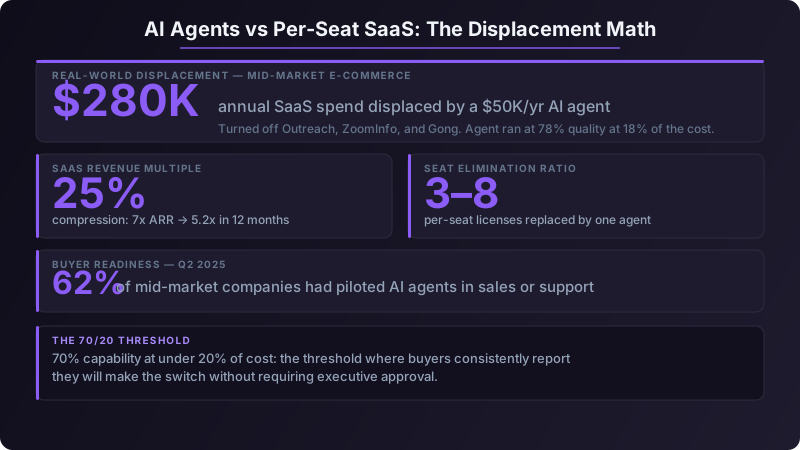
AI Agents Are Killing Per-Seat SaaS: What B2B Sellers Must Do Now
SaaS revenue multiples dropped 25% in twelve months. One AI agent subscription now replaces 3–8 seats at under 20% of current spend. Here's the repositioning playbook for vendors who want to survive the transition.
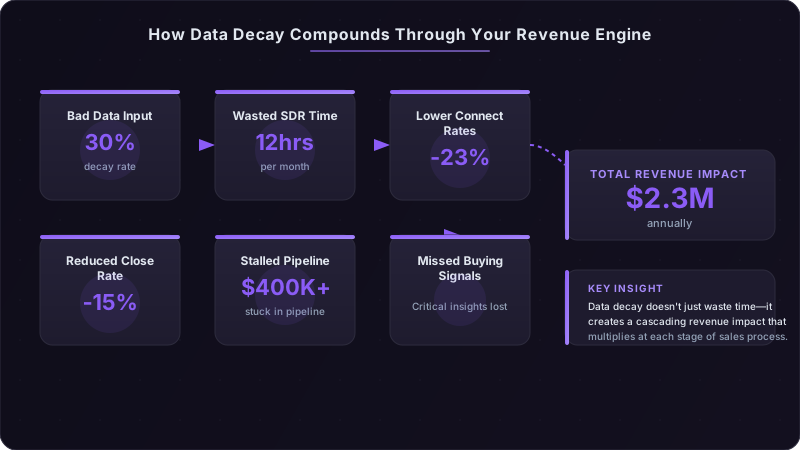
The Real Cost of Bad Sales Data: A $2.3M Problem Most Teams Ignore
Outdated contacts and wrong job titles cost B2B teams an average of $2.3M annually in lost pipeline. Here's how to calculate your own data decay rate.
Cracking the Dark Funnel: How to Attribute Revenue When 70% of the Buyer Journey Is Invisible
Most of your pipeline is influenced by channels you can't track. Podcasts, Slack communities, word-of-mouth, and private social sharing drive deals you'll never see in your CRM. Here's how to measure the unmeasurable.