Email Deliverability in 2026: How to Land in the Inbox (Not Spam)
Gmail and Microsoft's new AI spam filters are blocking more cold emails than ever. Here's how to adapt your outreach strategy and maintain high deliverability.
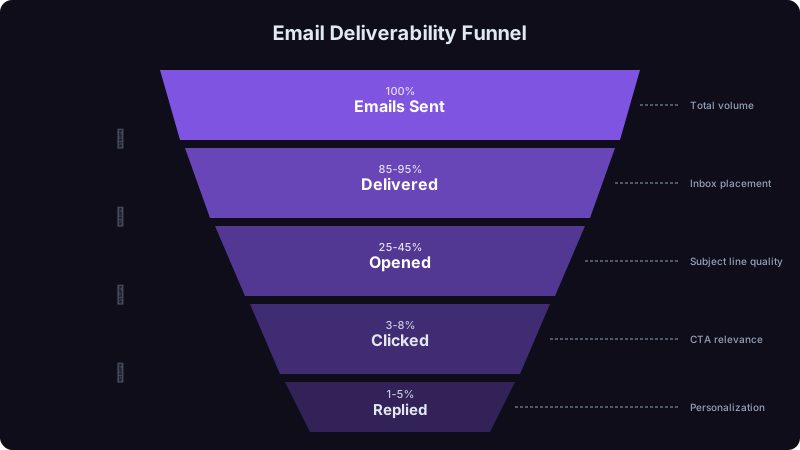
Last March, I got a panicked call from a sales leader at a 150-person SaaS company. Their cold email reply rates had dropped from 4.2% to 0.8% over six weeks. Nothing about their messaging had changed. Their lists were the same. Their sending volume hadn't increased.
The problem was deliverability. Gmail and Microsoft had quietly updated their AI spam filters, and this team's emails were landing in spam or getting silently dropped before reaching anyone's inbox.
I've spent the last two years diagnosing deliverability problems for outbound sales teams. What I've learned is that most teams don't realize they have a deliverability problem until it's severe, and by then, their domain reputation has taken real damage. Here's everything I know about staying in the inbox in 2026.
What Changed (and When)
The deliverability landscape shifted in three waves.
Wave 1: Gmail's February 2024 bulk sender rules. Google required SPF, DKIM, and DMARC authentication for anyone sending more than 5,000 emails per day. They enforced a 0.3% spam complaint ceiling. They mandated one-click unsubscribe headers. These were binary requirements, you either met them or your email didn't get delivered. Most sales teams adapted quickly because the rules were clear.
Wave 2: AI-powered content analysis (late 2024-2025). Both Google and Microsoft rolled out neural network-based spam detection that goes far beyond keyword matching. These models analyze patterns across millions of messages. They can detect when hundreds of emails share similar structures even if the specific words differ. They evaluate whether an email "looks like" the kind of message real humans send to each other, or whether it looks like mass outreach wearing a personalization costume.
Wave 3: Behavioral reputation scoring (2025-2026). This is the one that caught most teams off guard. Email providers now track how recipients interact with your messages over time. If a high percentage of people who receive your emails never open them, delete them without reading, or mark them as spam, your future emails get deprioritized, even to new recipients who've never seen your messages before. Your sender reputation follows you like a credit score.
Before 2024, deliverability was mostly about technical setup, authentication, clean IPs, proper headers. In 2026, deliverability is about behavioral signals. The filters are asking: "Do the people who receive this sender's emails actually want them?" If the answer is no, your emails disappear. No bounce notification. No error message. They just vanish.
How to Audit Your Deliverability Right Now
Before fixing anything, you need to know where you stand. Here's the audit process I run with every team.
Use MXToolbox or dmarcian to verify SPF, DKIM, and DMARC for every domain you send from (including subdomains and secondary domains). A surprising number of teams have DMARC set to "none" instead of "quarantine" or "reject," which means they're technically compliant but not getting the reputation benefit.
Send test emails to seed accounts across Gmail, Outlook, and Yahoo using a tool like GlockApps or Mail-Tester. Don't just check one provider, I've seen emails land perfectly in Gmail but go straight to spam in Outlook. You need the full picture.
Pull your last 90 days of sending data. Map daily volume by domain. Look for spikes, any day where you sent 3x your normal volume from a single domain is a red flag. The filters notice sudden jumps and penalize them.
Segment your sent emails by week and measure open rates and reply rates for each cohort. If you see a downward trend over weeks, your reputation is degrading. If you see a sudden cliff, something triggered a filter change.
Use MXToolbox's blacklist check on every IP and domain you send from. Being on even one major blacklist (Spamhaus, Barracuda, SORBS) can tank deliverability across all providers.
Strategies That Actually Work in 2026
I've tested dozens of approaches across 30+ sales teams. Here's what moves the needle.
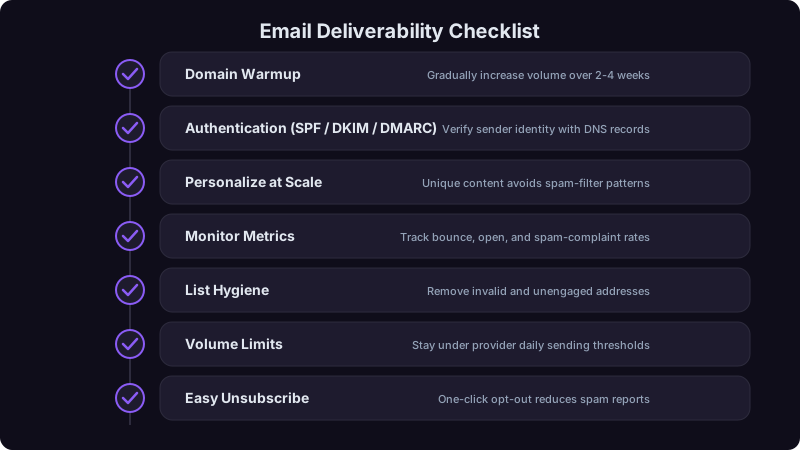
1. Domain Rotation with Dedicated Warm-Up
Never send cold outreach from your primary company domain. Set up 3-5 secondary domains (variations of your brand name) and rotate between them. Each domain should have its own warm-up cycle.
The warm-up process I recommend:
| Week | Daily Send Volume | Audience |
|---|---|---|
| Week 1 | 5-10 emails | Personal contacts who will reply |
| Week 2 | 15-25 emails | Mix of personal and warm leads |
| Week 3 | 30-50 emails | Warm leads and engaged prospects |
| Week 4 | 50-75 emails | Begin mixing in cold outreach |
| Week 5+ | Max 75-100 emails | Normal cold outreach cadence |
I cap cold sends at 75-100 per domain per day. I know that sounds low. But consistently sending 75 emails per day across 4 domains (300 total) with strong deliverability produces more replies than blasting 500 from one domain where half land in spam. Volume means nothing if your emails are invisible.
2. Content Variation That Fools AI Pattern Detection
The AI filters are looking for templates. If 200 of your emails share the same structure, same sentence length patterns, same paragraph breaks, same question-and-CTA format, they get flagged as bulk mail regardless of how much you personalize the details.
What works:
- Vary email length dramatically. Some emails should be 2 sentences. Others should be a full paragraph. Don't settle into one format.
- Change structural patterns. Sometimes lead with a question. Sometimes lead with an observation. Sometimes lead with data. The randomization should feel natural, not algorithmic.
- Write like a real person. Short sentences. Sentence fragments are fine. No perfect grammar. Include the occasional typo you'd naturally make. Real emails from real humans are messy. Polished perfection triggers spam filters because it looks machine-generated.
- Avoid spam trigger phrases. "Limited time offer," "schedule a call," "I'd love to," "quick question", these phrases appear in millions of spam emails. The filters know them. Rephrase.
3. Engagement-Based Sending
This is the single biggest tactical change I recommend. Most teams send to their entire list on the same schedule. Instead, segment by engagement and adjust accordingly:
Engaged prospects (opened or clicked previously): Send at your normal cadence. These positive signals boost your sender reputation.
Neutral prospects (no opens, no spam reports): Slow your cadence. Wait 7-10 days between touches instead of 3-4. If no engagement after 3 sends, remove them from the sequence. Every ignored email drags your reputation down.
Never-engaged contacts: Stop sending. Seriously. After 4-5 emails with zero engagement, continuing to email that address actively hurts your deliverability to everyone else on your list.
Sending fewer emails to better-targeted prospects will produce more replies than sending more emails to a broader list. I've seen this play out with every team I've worked with. The math is simple: 100 emails with 95% inbox placement and 5% reply rate = 5 replies. 300 emails with 40% inbox placement and 1% reply rate = 1.2 replies.
4. Email Verification as Non-Negotiable Infrastructure
Every email address needs to be verified before it enters any sequence. Not verified once when you bought the list. Verified in real-time, right before you send.
Invalid emails bounce. Bounces destroy sender reputation. A bounce rate above 3% will visibly impact your deliverability within days.
The standard I hold teams to:
Yes, this means you'll throw out some percentage of your prospect list. That's the point. Those addresses were going to hurt you more than help you.
5. Smart Reply and Unsubscribe Handling
Set up one-click unsubscribe headers on every cold email. I know this feels counterintuitive, why make it easy for someone to opt out? Because the alternative is worse. When someone can't easily unsubscribe, they hit the spam button. Spam complaints count 10-50x more against your reputation than unsubscribes.
Also: reply to every response, even negative ones. When someone says "not interested," reply with a brief, polite acknowledgment and remove them. The reply signals to email providers that this is a real two-way conversation, which boosts your reputation.
Metrics to Track Weekly
Don't wait for a crisis. Track these numbers every week:
| Metric | Healthy Range | Warning Sign | Action if Triggered |
|---|---|---|---|
| Inbox placement rate | 90%+ | Below 80% | Pause sending, audit authentication |
| Bounce rate | Below 2% | Above 3% | Re-verify list, pause new contacts |
| Spam complaint rate | Below 0.1% | Above 0.2% | Review messaging, add clear unsubscribe |
| Open rate (proxy) | 40-60% | Below 25% | Content may be hitting spam, test placement |
| Reply rate | 3%+ | Below 1% | Messaging or targeting problem |
| Unsubscribe rate | Below 1% | Above 2% | Targeting too broad, refine ICP |
Apple Mail Privacy Protection and similar features inflate open rates artificially. Don't use opens as your primary metric. Reply rate is the most reliable signal of actual inbox placement and message relevance. If your open rates are high but replies are low, your "opens" might be machine-generated, not human.
A Real Recovery Story
That SaaS company I mentioned at the start? Here's what we did over 6 weeks:
- 1Paused all cold outreach for 5 days. Let the domain reputation stabilize.
- 2Verified their entire contact database. Removed 22% of addresses as invalid, risky, or catch-all.
- 3Set up 3 secondary domains with proper authentication and began a slow warm-up.
- 4Rewrote their sequences with genuine content variation, not just different merge fields, but structurally different emails.
- 5Implemented engagement-based sending. Stopped emailing prospects who showed zero engagement after 3 touches.
- 6Capped volume at 60 emails per domain per day during recovery.
Results after 8 weeks:
They were sending 62% fewer emails and getting 5x more replies. That's the deliverability equation in 2026: less volume, better targeting, more results.
The Uncomfortable Truth
Email deliverability in 2026 is fundamentally a quality game. The teams that treat cold email as a numbers game, "just send more", are the ones watching their reply rates crater. The teams that treat every email as a message that needs to earn its place in someone's inbox are the ones booking meetings.
The filters are going to keep getting smarter. The bar for what "looks like legitimate business communication" is going to keep rising. The teams that adapt to this reality, smaller lists, better targeting, genuine personalization, obsessive technical hygiene, will own the inbox while their competitors wonder why nobody's responding.
Run the 5-step audit above this week. Most teams discover at least one significant deliverability issue they didn't know about. Finding it now, before it tanks your next campaign, is the highest-ROI hour you'll spend this month.
Ready to transform your sales pipeline?
See how Prospectory's AI-powered platform can help your team research, reach, and relate to prospects at scale.
Related Articles
1 in 6 B2B Emails Vanish: Fix Your Authentication Before Q3
Microsoft Outlook now delivers only 75.6% of B2B emails. Here's the non-technical RevOps playbook for SPF, DKIM, DMARC, domain warming, and volume spike management.
Why 58% of Your Replies Come From Email #1 (And How to Fix the Rest)
Most replies happen on your first email, not your seventh. Here's the sub-80-word framework, signal-based personalization tactics, and data that prove long sequences are dying.
The Follow-Up Problem: Why 80% of Sales Emails Never Get a Second Touch
Most sales sequences die after one email. Here's the data-backed 5-touch framework that increased our response rates from 3.4% to 18.2%.